Agentic AI Workflows for OpenJDK Development
OpenJDK is a large and complex codebase and navigating it efficiently takes years of experience. This post is about how I’ve been using agentic AI workflows to move faster in that environment, what has worked for me, and where I as a human still provide the most value.
At the time of writing (2026-05-23), work in the OpenJDK community should follow the OpenJDK Interim Policy on Generative AI. A short summary of the policy is:
Contributions in the OpenJDK Community must not include content generated, in part or in full, by large language models, diffusion models, or similar deep-learning systems.
…
Contributors in the OpenJDK Community may use generative AI tools privately to help comprehend, debug, and review OpenJDK code and other content, and to do research related to OpenJDK Projects, so long as they do not contribute content generated by such tools.
Agentic Workflows
In my work I use git worktrees to separate larger features that I am developing. This is a great way to isolate JDK builds and source code changes from each other, in both agentic and non-agentic workflows alike. Without an isolation layer like this, I’ve seen agents interfering with each other by changing nearby files which alters assumptions and can lead to wrong conclusions.
Investigations (bugs, review, understanding)
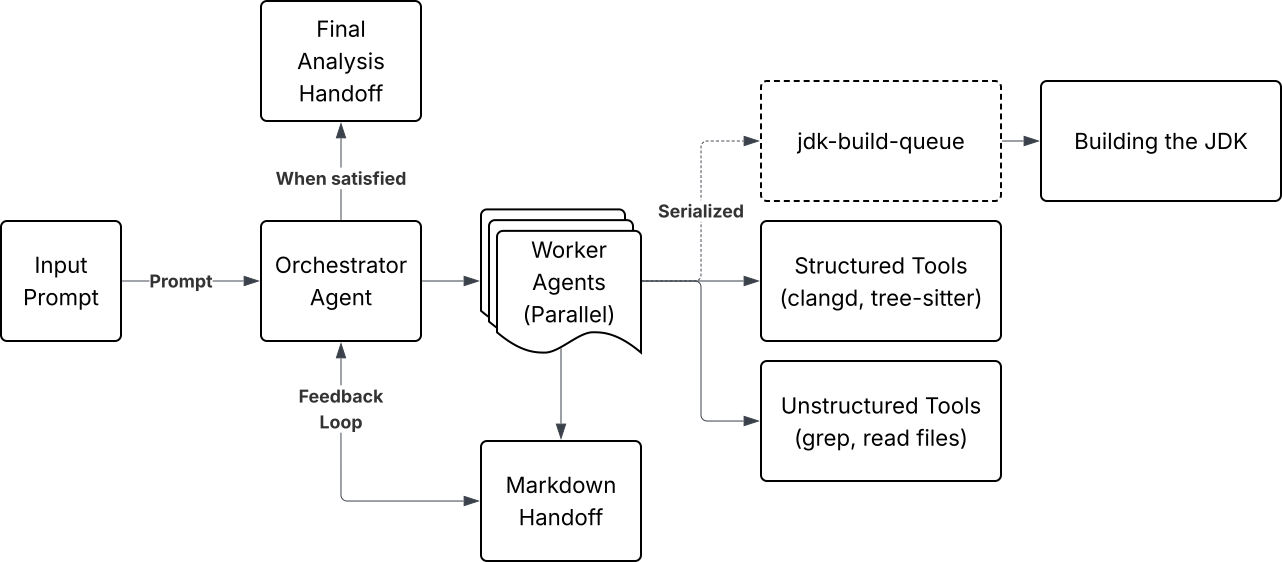
One of the more interesting use-cases of AI has been in approaching large changes, or large systems in general, using multiple agents to investigate different leads in parallel in an agentic workflow. This has been very valuable in my work on larger code-changes and ongoing projects in OpenJDK. The workflow combines several skills and MCP servers into a single system.
-
jdk-worktree-build
This skill details how to configure and build the JDK, with specific instructions on what to name, when to use and when to re-run configurations, as well as what make targets to run for specific tasks.
Since I’m using worktrees in my “non-agentic” work as well, I can reuse this skill when hooking agents into other work, which is nice.
-
jdk-build-queue
Building/compiling the JDK is a task which requires a significant amount of resources on the system and I only want one build to be compiled at a time on my system. To serialize builds among agents, I have an MCP server that is a lock and queue combination, where agents request to start a build, or place themselves on a queue to build next. When a build is finished, the agent releases the lock and signals the next agent that it is their turn. The MCP server is only a wrapper around the lock and queue, actual builds are handled by the agents themselves using the jdk-worktree-build skill.
I categorize tasks as lightweight and heavyweight, where ligthweight tasks can be run without locking, which includes tasks like running a test without building the JDK (
make test-only), or test-compiling a single source-code file. Allowing lightweight tasks to be run in parallel with heavyweight tasks allows agents to make as much progress as possible, while not hurting each others’ progress too much.I went with a separated approach for jdk-worktree-build and jdk-build-queue since skills are more flexible to adjust and read, which is good since I’m still figuring out what a good approach looks like. MCP servers are likely more deterministic, but are also less flexible. Neither a skill or MCP server provide good protection for agent hallucination, since agents can interpret skills non-deterministically, or choose not to use an MCP server at all. I think the optimal workflow here would include a functional way that makes builds only possible when holding a build lock, which is a complex task, but maybe worth investigating in the future.
-
jdk-lsp-clangd
This skill, together with an MCP server of the same name, exposes the language server protocol client clangd to agents. This functionality is built into harnesses like Opencode and Claude Code, but not to Codex. There’s an open issue proposing this to be added to Codex at github.com/openai/codex/issues/8745.
The benefits of exposing clangd to agents is that agents can work with code in a much more structured way, as opposed to relying on grep to navigate the OpenJDK codebase. Clangd exposes capabilities like listing incoming calls to functions, getting all references of a variable, and showing type hierarchies, and much more.
Since clangd requires a compilation database, in the form of a
compile_commands.jsonfile for example, this skill and MCP server combination hooks into the OpenJDK way to set one up using the make targetmake compile-commands, and it’s default location. -
jdk-tree-sitter
Just like exposing a language server to agents, tree-sitter allows agents to have a more structured way to look at code, now instead by looking at code files through the lens of a concrete syntax tree (CST). This skill doesn’t strictly speaking do anything specific for OpenJDK, so could really be formulated as a general skill.
-
jdk-investigation-agent
This is the “orchestrator” skill, detailing an agentic workflow that combines the rest of the skills into a coherent structure. It details how to start an investigation by figuring out what areas to look at (“throwing a wide net”), and then hand off work to a number of agents that will create their own worktrees to work from. The agent(s) will then investigate the source code, maybe spawn more agents that try to create a reproducer if a concrete lead is found, maybe instrument the code to aid investigation, and maybe compile the JDK if it needs to, using the jdk-build-queue skill.
Since we’re prohibited from contributing AI-generated content to OpenJDK, this skill also tells the agent that it should not include source-code changes in its findings, only to explain findings in prose.
Markdown Handoffs
When agents are finished with their investigation, they create markdown files with a report of any issues they’ve found. These reports are useful as a starting point if I need to investigate further in a new session, but also for me as a way to read and understand what has been found. The markdown files can also be plugged in to separate visualization tools and indexing databases, which I’ve experimented with a bit to get a better overview of results.
The handoffs also help manage context (see context engineering), by compacting the agent’s findings into a summarized document.
Agentic Workflows Conclusion
In informal A/B testing, exposing structured tools like clangd and tree-sitter generally reduced investigation time and token usage, likely because it reduces the need for repeated file searches and exploration using grep. It’s difficult to draw any precise conclusions from this since agent behavior is non-deterministic and workflows vary between runs, but the effect is noticeable enough that I now have it available in all my agentic workflows.
When investigating several bugs and enhancements using this workflow, I’ve often found that agents place extra weight on language-code asymmetries rather than behavioral correctness. It often sides with language in stating what’s wrong, like “TODO”-comments being high priority, or that a documentation for an API is always more correct than the code implementation, even though the code could be much more reasonable in some scenarios. My best guess is that this happens because agents show bias towards written language, since that probably makes up the majority of their training data.
Agents are undoubtedly good at finding inconsistencies, but less so at knowing what a “correct” approach for a given situation is. They don’t have a good sense of what “matters” when taking an entire system into account. Maybe this will get better as agents can have more information in their context window, but larger context windows might also affect results negatively through possible attention bias, prioritizing the wrong things for the task at hand.
In more localized settings, the agents have shown great value in narrowing down and finding/creating reproducers, small Java-programs that can trigger a certain bug or behavior. Many issues are intermittent or only happen under very specific circumstances, so having a reliable reproducer makes implementing a fix a whole lot easier.
Restricting Execution
A non-trivial amount of my work is investigating performance regressions, where I’ve attempted to use AI in a few scenarios. So far it has been really helpful in finding ways to isolate variables and root-causes by testing changes iteratively.
In one regression I tackled an issue with Transparent Huge Pages on Linux (THP), which can be tuned via the files listed below. Changing the values in these files requires sudo privileges, which I don’t want to provide the agent blanket access to.
/sys/kernel/mm/transparent_hugepage/enabled
/sys/kernel/mm/transparent_hugepage/shmem_enabled
To get around this, I created a wrapper that allows setting the value of these files to either always or never, not anything else. Then I changed the owner of the wrapper to the root user so that an agent can’t change the contents of it, and added the wrapper to the sudoers file so that it can be run without sudo.
Either using a skill, or telling an agent directly, I inform it that this wrapper exists and to use it for toggling the THP mode(s). This way I can have the agent change modes without prompting me for permission or using sudo commands.
This is one approach to allow only specific actions to agents with a fairly minimal setup. You could achieve similar restriction with an MCP server, but that requires a bit more work.
Debugging
I’ve used AI in several ways to debug issues in OpenJDK, mainly through MCP servers that expose debugger functionality to agents.
The first MCP server I tried was LLDB’s built-in MCP server, which is useful when you already have a running LLDB session and want to attach an agent to assist you. However, this approach is limited when you want an agent to start debugging on its own, since MCP servers need to be running before the agent harness (like Codex) starts.
To support agent-initiated debugging sessions, I’ve experimented with and built MCP servers that act as wrappers around debugger functionality. This approach is similar across tools like GDB, RR, and LLDB, where the server exposes operations such as starting sessions, stepping, inspecting state, and setting breakpoints.
A key challenge in these wrappers is defining the boundary of what the agent is allowed to do. Exposing too much flexibility can allow the agent to execute unintended or unsafe commands through the debugger interface, effectively bypassing the sandbox of the harness. However, exposing too little limits the agent’s ability to explore and reason effectively. This becomes a trade-off between safety and the quality of signals the agent can access during debugging.
In my experience, debugging with agents is often less constrained by reasoning ability and more by signal quality. Debugging environments contain many possible signals like: stack traces, program state, and runtime behavior, but not all of them are equally useful. Without clear guidance, agents tend to over-weight incidental or misleading signals and draw overly strong conclusions from them. I’ve found that providing structured inputs such as crash reports and stack traces significantly improves results, which helps the agent focus on what actually matters.
Closing Thoughts
The bottleneck in my work, and in many open source projects I believe, is not finding things to work on (which AI can definitely help with), but the deeply human work of navigating a project. Knowing when something is ready to propose, how to frame it given what’s already in-flight and planned for the future, and discussions with reviewers, are often more complex than the code changes themselves.
I’ve been able to get the most out of using AI and agents in areas which I am already very competent in, where I can provide a solid background and context. Pairing this with my experience in contributing to several large-scale OpenJDK projects, I’ve been able to provide additional value in multiple areas. But, if nothing else, the AI is a really good “bollplank” as the Swedish saying goes, opening up an approachable way to ask “stupid” questions to challenge my assumptions and help me learn new ideas and concepts in less time.
So far in my career I’ve spent a lot of time pattern-matching, trying to find ways to minimize repetition. I’ve found that this skill transfers directly to working with AI, where recognizing repeating patterns and finding streamlined solutions allows me to work much more efficiently with AI than I otherwise would have.
Using worktrees, MCP server(s), and approaches to manage context/memory are things that many developers already know about. I think the more complex task is being inventive and creative in figuring out how to apply methods like these to the specific thing you’re working on, like OpenJDK development in my case.